Easy Mac optimizer for maximum performance
Choose MacKeeper for faster startup time, more available memory, and automatic app updates.
DownloadOptimize your Mac in 3 easy steps
Resource-intensive apps often cause overheating or the dreaded spinning wheel. Run MacKeeper’s Memory Cleaner to instantly optimize your Mac’s memory, then quit useless processes for an extra push.
How it works- free up RAM space
- see what’s gobbling up your memory
- stop memory-draining apps
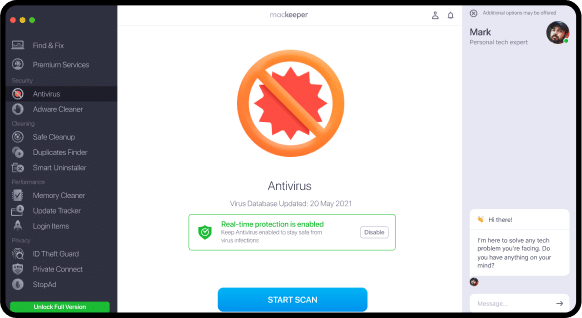
The more apps set to launch, the slower your Mac starts. Use the Login Items feature to manage these launch apps and put yourself back in control.
How it works- reduce startup time
- find hidden apps launching every time
- remove useless items from startup
No matter where you get your apps, our Update Tracker feature checks all of them for available updates, patches, and upgrades.
How it works- use the most secure app versions
- see all available updates in one place
- decide which updates to install or skip

Optimizing your Mac speed is just the start

Clean all the junk
- Safely remove junk files
- Get rid of duplicates and similar photos
- Free up space after deleting useless apps

Stay safe from viruses
- Block malware in real time
- Get rid of adware infections
- Monitor for potentially unwanted apps 24/7
You asked, we're answering
Will the performance tune-up affect my speed?
It should help your Mac run at least a little faster. Of course, every Mac is different, and a lot depends on how many apps are open, or how memory-consuming they are. However, in most cases, the basic performance tools included in MacKeeper should have a positive impact on your Mac’s speed.
What does optimizing your Mac do?
MacKeeper uses its powerful performance toolkit to help your Mac run smoother. So, we’ll help you clean up your RAM, and make sure your computer has enough memory to run several apps. Our performance optimizer will also display the list of all items launching at startup. Removing useless ones may help you boot your Mac faster. Finally, complete your optimization by updating old apps without essential security updates. Unless updated, they tend to run slower than they normally should.
How long does the system optimization take?
It depends. If your Mac isn’t too cluttered, it’s a matter of seconds. However, if you haven’t optimized your Mac for months or years, the entire process could take a few minutes.
- System Requirements: macOS 10.13 or later, 100 MB of spaceFull requirements
- Latest Software Version: 6.2, Jan, 2023
- Pricing: Starting at $10.95/month
- Developer: Clario Tech DMCC
**Notarization is not the App Review. The Apple notary service is an automated system that scans your software for malicious content.